

The ExecuteQueries REST API has the ability to fully reach GA which makes the increase in custom solutions to query Datasets in Power BI noticeable.
The most frequently asked question in the Power BI community is focused on the main REST API usage scenarios. And the answer is that the ExecuteQueries API is capable of extending the reach of business solutions that use Power BI datasets, but there are some limitations that must be taken into account.
That is, the ExecuteQueries API is a great choice for retrieving small blocks of data, automating testing of datasets, and implementing BI-driven cloud solutions, among other functions.
One key characteristic that these scenarios have in common is that they work at a small scale. For example, the ExecuteQueries API restricts query results to 100,000 rows or 1,000,000 values per query (whichever is encountered first), so it is clearly not the right choice if you want or need to retrieve hundreds of millions of rows. If you want to use the ExecuteQueries API, you must keep the query results small.
The ExecuteQueries API is also not the right choice for large-scale middleware, such as data visualization applications supporting thousands of concurrent users, because the ExecuteQueries API limits the number of queries to 120 per minute. If a service or application exceeds this limit, queries will fail with HTTP error code 429. This clearly puts a cap at scalability because there’s only so many requests you can submit. Currently, we have no plans to increase this limit.
So, what do you do when you need to work on a larger scale than the ExecuteQueries API can support?
Switch to XMLA endpoints on Power BI Premium! XMLA is the communication protocol of the Microsoft Analysis Services engine.
As the following diagram illustrates, XMLA supports rich clients, third-party clients, data modelling tools, as well as custom data visualization and data management solutions at the scale of the underlying Premium capacity.
XMLA in and of itself does not impose any limits on query load or result set sizes. The XMLA protocol is able to use more optimized protocol formats and avoids the cost of encoding large results into JSON.
It is therefore the right choice if your requirements exceed the ExecuteQueries API capabilities because you’re getting an unthrottled client/server connection to the Analysis Services engine that runs inside of Power BI.
Note, however, that this typically requires the use of Analysis Services client libraries, which your solution must be able to load to communicate through XMLA endpoints.
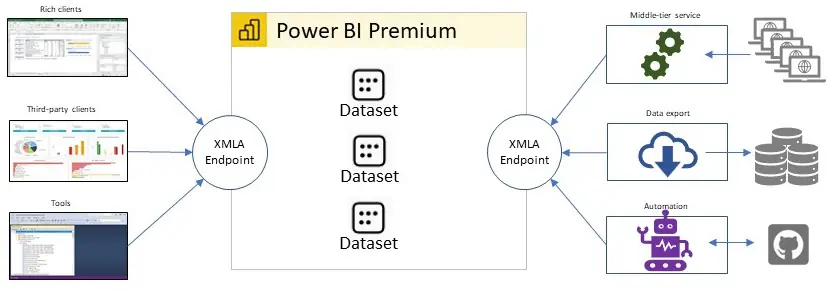
One great example of a middle-tier service leveraging XMLA endpoints is David Browne’s HTTP proxy for Power BI Premium and Azure Analysis Services.
It’s implemented as an ASP.NET Core 5 API Project, lets you POST a DAX query via its main /api/Query endpoint, and returns query results as a JSON document very similar to the ExecuteQueries API.
If you are noticing an increasing rate of “429” HTTP errors in your business solution, which would indicate that you are reaching the ExecuteQueries API’s throttling limits, it might be feasible to switch quickly to such an HTTP proxy in order to avoid the throttling via XMLA endpoints.
More long-term, you could then opt to refactor your business solution to communicate with XMLA endpoints directly.

While it is relatively straightforward to query Power BI datasets, the XMLA connection handling is somewhat more involved, especially at scale. The ExecuteQueries API does not require any special connection handling, yet the XMLA protocol does because it is a stateful protocol.
It would be inefficient to establish a new XMLA connection for each query and then close the connection when the results have been received.
Instead, consider maintaining a pool of open connections so that you can send queries without the connection overhead. Note though that Power BI might close open connections for several reasons, such as when temporarily evicting a dataset to accommodate other workloads on the same Premium capacity.
If a query fails because a connection was lost, consider opening a new connection and retrying the query. Check out the ConnectionPool.cs file in David’s HTTP proxy sample for a simple Connection Pool that may serve as a starting point for your own implementation.
And that’s it for a high-level introduction to refactoring data visualization apps and other business solutions if you notice that the throttling in the ExecuteQueries API is starting to create scalability issues.
The ExecuteQueries API is a great choice at small scale, especially if you are using Power BI shared. For large-scale solutions, more often than not, you will need to switch to XMLA endpoints and host your datasets on Power BI Premium. Power BI APIs can support you at any scale, but there is no one-size-fits-all API.
Choose the technologies that are right for your solution’s purpose and scalability requirements and migrate your solutions to XMLA endpoints if you want to avoid throttling and resultset-size limitations.
Source: Blog Power BI.
Original Post Author: Kay Unkroth.
Every Friday we post a new article about Power BI here at DataEX Blog. Stay tuned to our social networks and don't miss the news focused on Microsoft's number one technological tool.
